Session Studio

The note is drafted. You sign it.

A session-capture workspace for outpatient behavioral health. It runs the day's caseload, records behind a consent gate, and turns the session into a DAP progress note you review line by line. Audio stays on the device; nothing reaches the chart until you sign.

Today — the caseload, and what it is waiting on

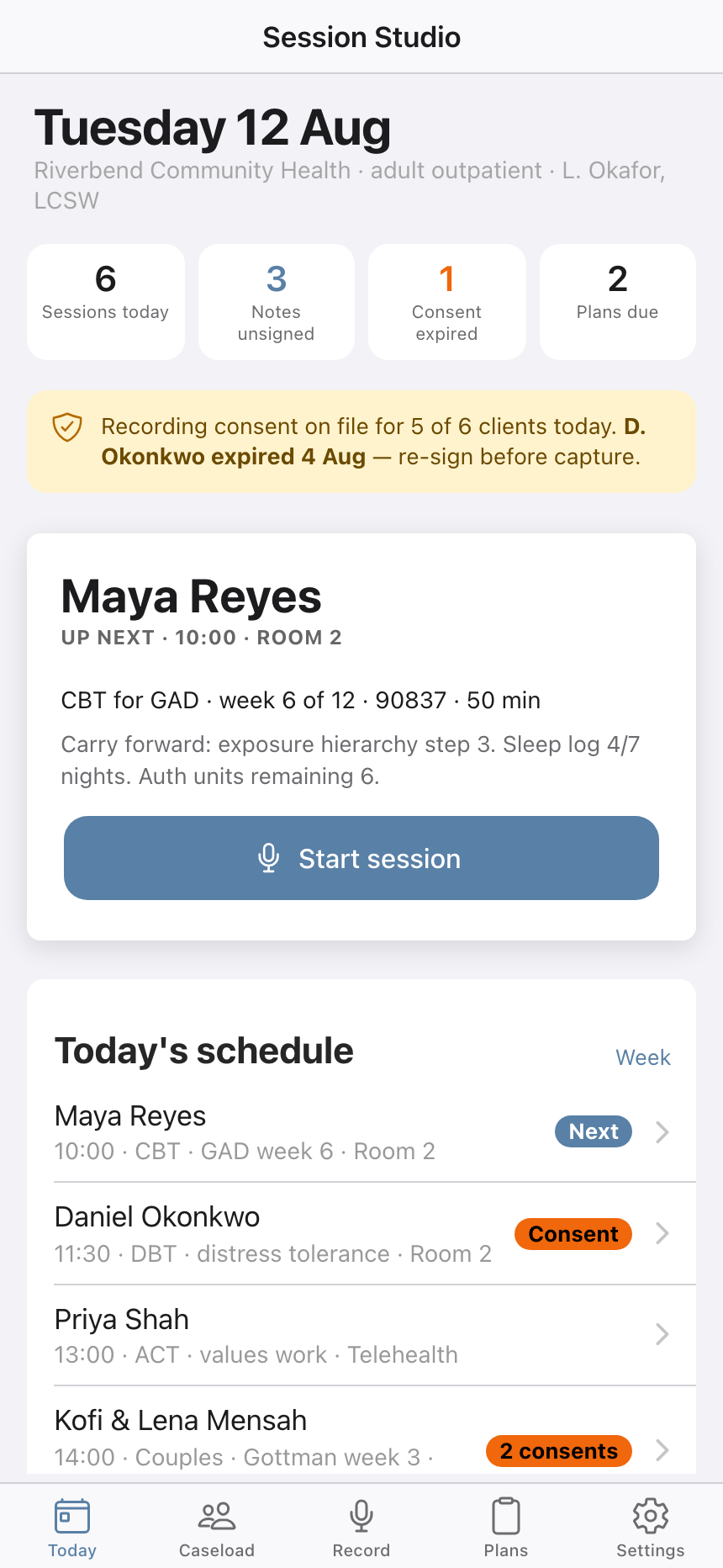
The day opens on four counts and the one that matters is the red one: a consent that expired. Under it, the next appointment carries its own context forward — which week of the protocol, which CPT code, what was left unfinished last time, and how many authorized units remain.

Sessions todayThe booked caseload
Notes unsignedDrafts still waiting on you
Consent expiredCapture is blocked for that client until it is re-signed
Plans dueTreatment plans past their review date
Session Studio's Today screen showing counts for sessions today, unsigned notes, an expired consent and plans due, an amber consent warning naming the client whose consent expired, the next appointment with its protocol week and CPT code, and the day's schedule

Recording, with the consent gate in front of it

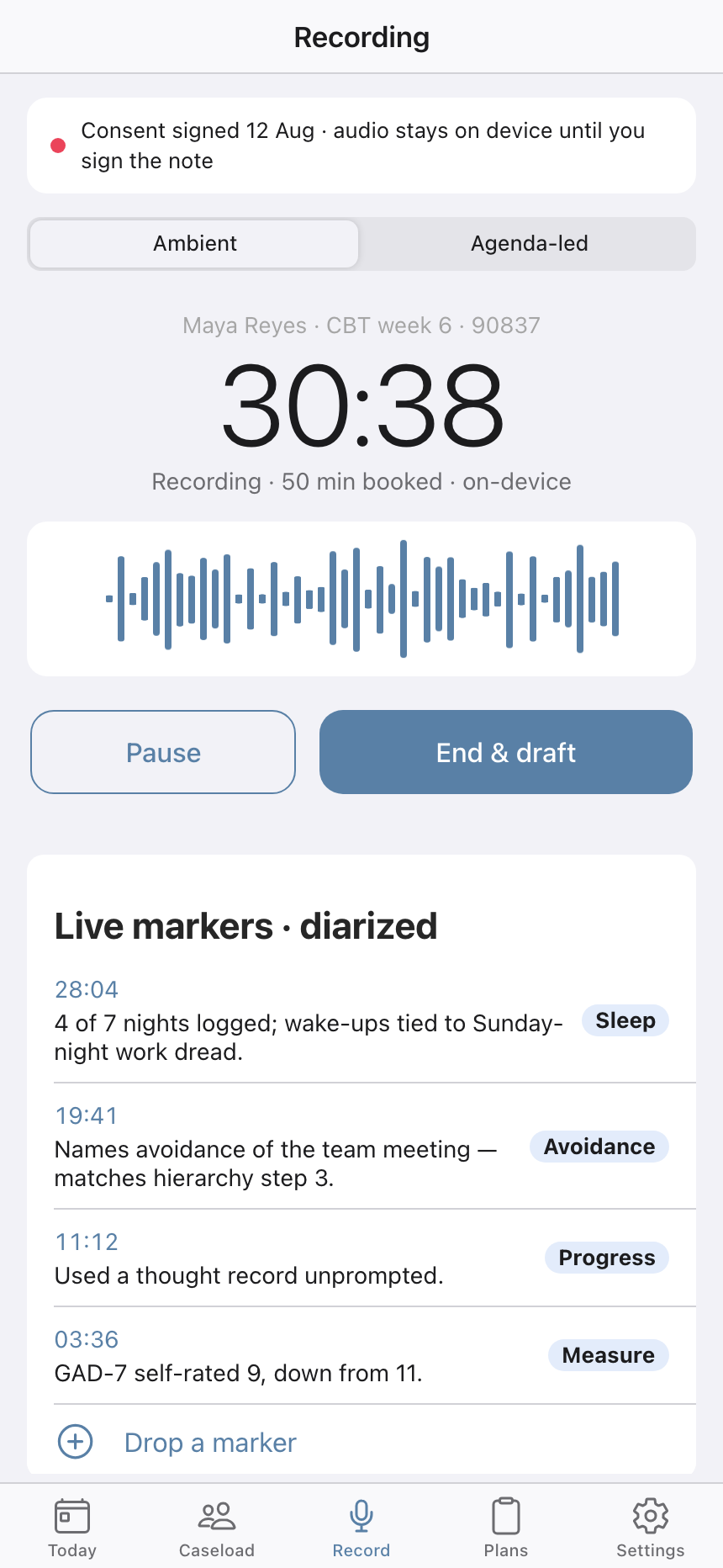
Two capture modes: ambient, or agenda-led against the session plan drawn from the client's protocol. A status dot states which one is true — recording, or paused with "nothing is captured while the indicator is grey". Agenda items you never tap carry into the next session's plan rather than quietly disappearing.

Session Studio's recording screen with an ambient and agenda-led mode switch, a consent line stating audio stays on device until the note is signed, a running timer, a waveform, pause and end-and-draft buttons, and a list of timestamped session markers

A DAP draft that shows its work

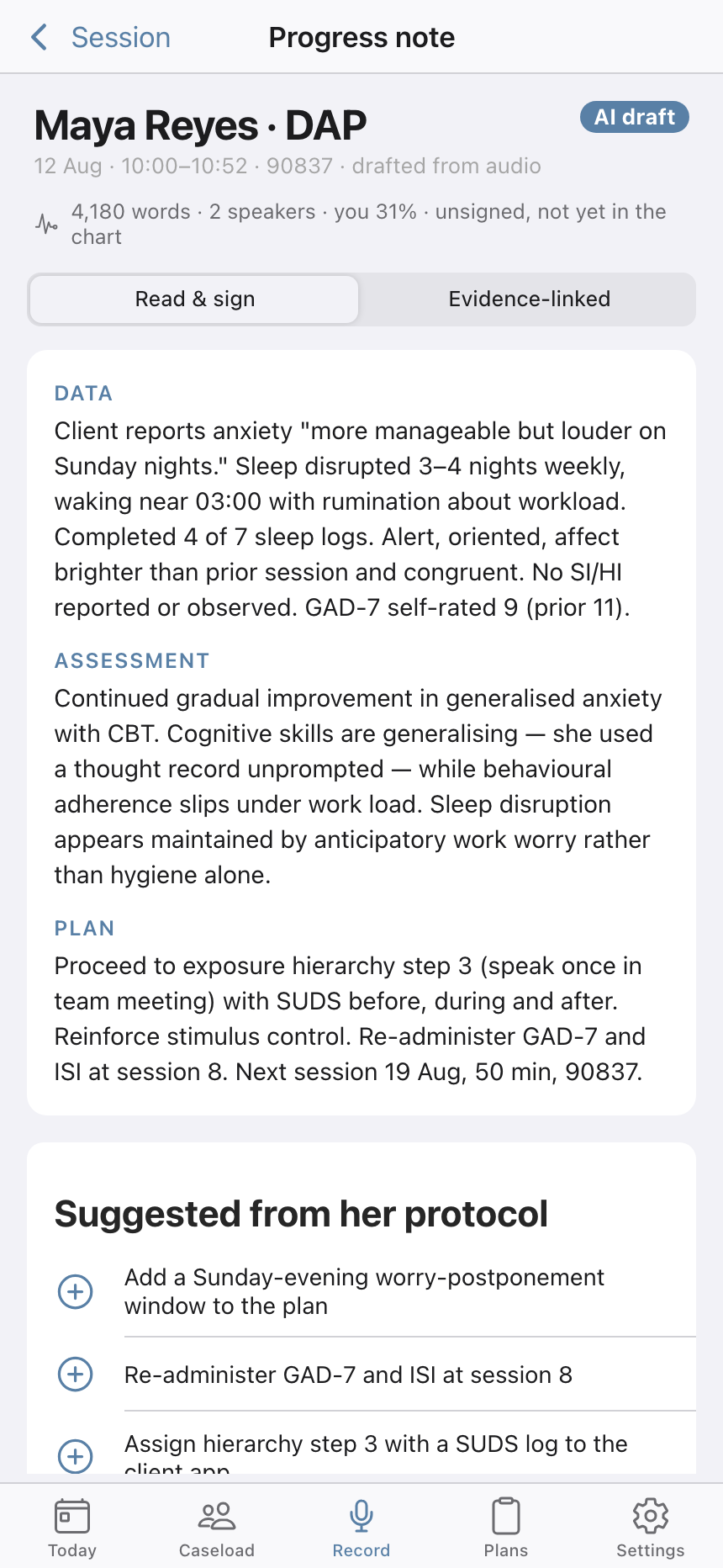
The draft arrives in the three DAP sections — Data, Assessment, Plan — and each one is labelled with how much to trust it. Sections grounded in the session read "high confidence"; an inference across several sessions is marked "review advised" and says so out loud: no direct quote, verify the hypothesis. Accept sections one at a time, or rewrite them.

DataWhat happened, from the session
AssessmentClinical picture — flagged when inferred
PlanWhat comes next, and the homework it implies
Sign & routeSends for co-signature and writes an audit entry
A drafted DAP progress note in Session Studio marked with an AI draft badge and an unsigned warning, showing the Data, Assessment and Plan sections in full with suggestions drawn from the client's treatment protocol below

Five rules the recorder actually enforces

These are settings in the app, not a privacy page. They are on by default and each one is a switch you can see.

Consent before captureThe recorder refuses to start without a current signature
On-device audio onlyAudio never leaves the phone; only the transcript syncs
Delete audio after signingTranscript and note retained per agency policy
Visible recording bannerPersistent indicator for the person in the room
AI suggestions in notesDrafts stay unsigned until you accept them

Treatment plans, and whether they are working

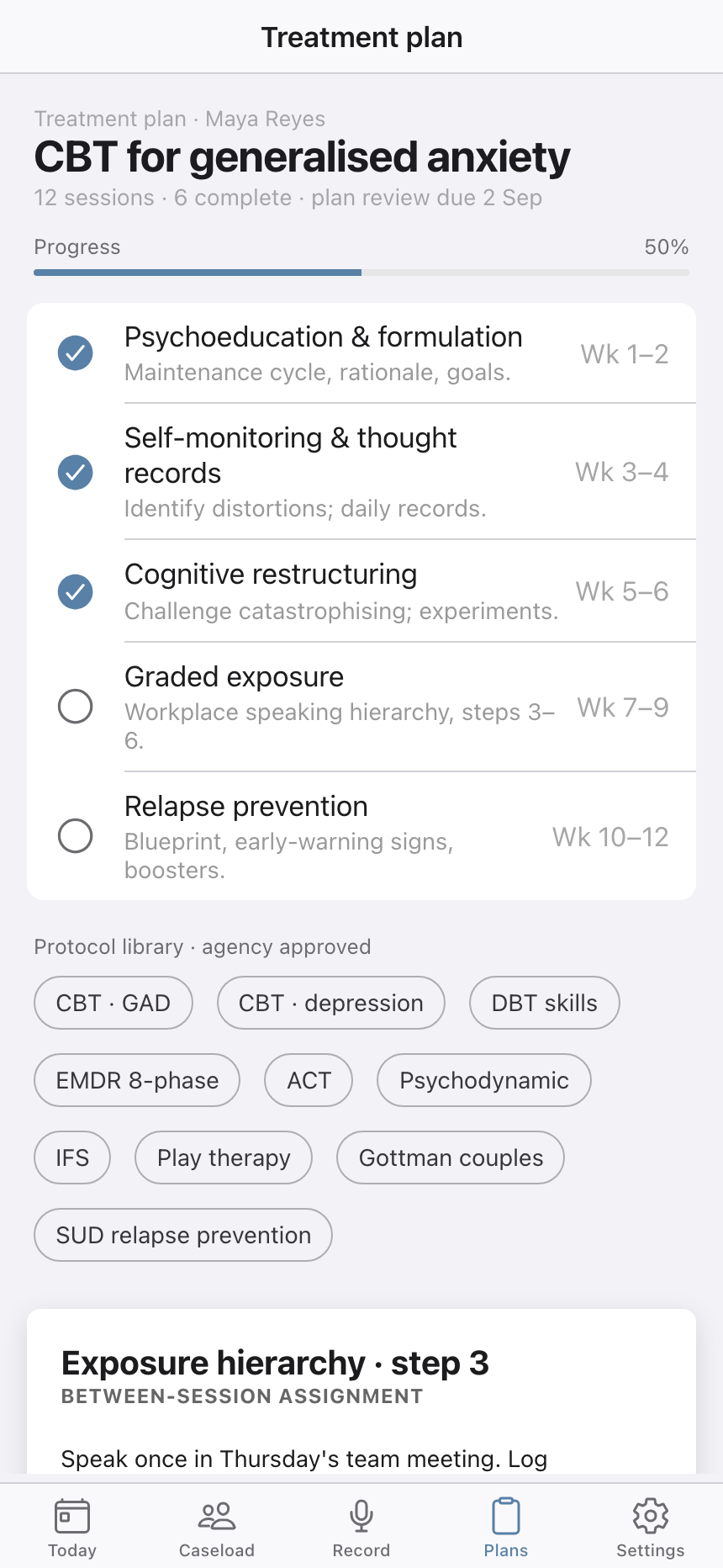
Each client runs against a named, agency-approved protocol — CBT for GAD, DBT skills, EMDR 8-phase, ACT, IFS, Gottman couples, SUD relapse prevention and more — broken into phases with week ranges, so "week 6 of 12" means a specific place in a specific ladder.

Psychoeducation & formulationWeeks 1–2
Self-monitoring & thought recordsWeeks 3–4
Cognitive restructuringWeeks 5–6
Graded exposureWeeks 7–9
Relapse preventionWeeks 10–12
A CBT for generalised anxiety treatment plan in Session Studio, half complete at six of twelve sessions, with five phases checked off or pending against their week ranges, and a row of agency-approved protocol chips beneath

Outcomes measured against a threshold, not a vibe

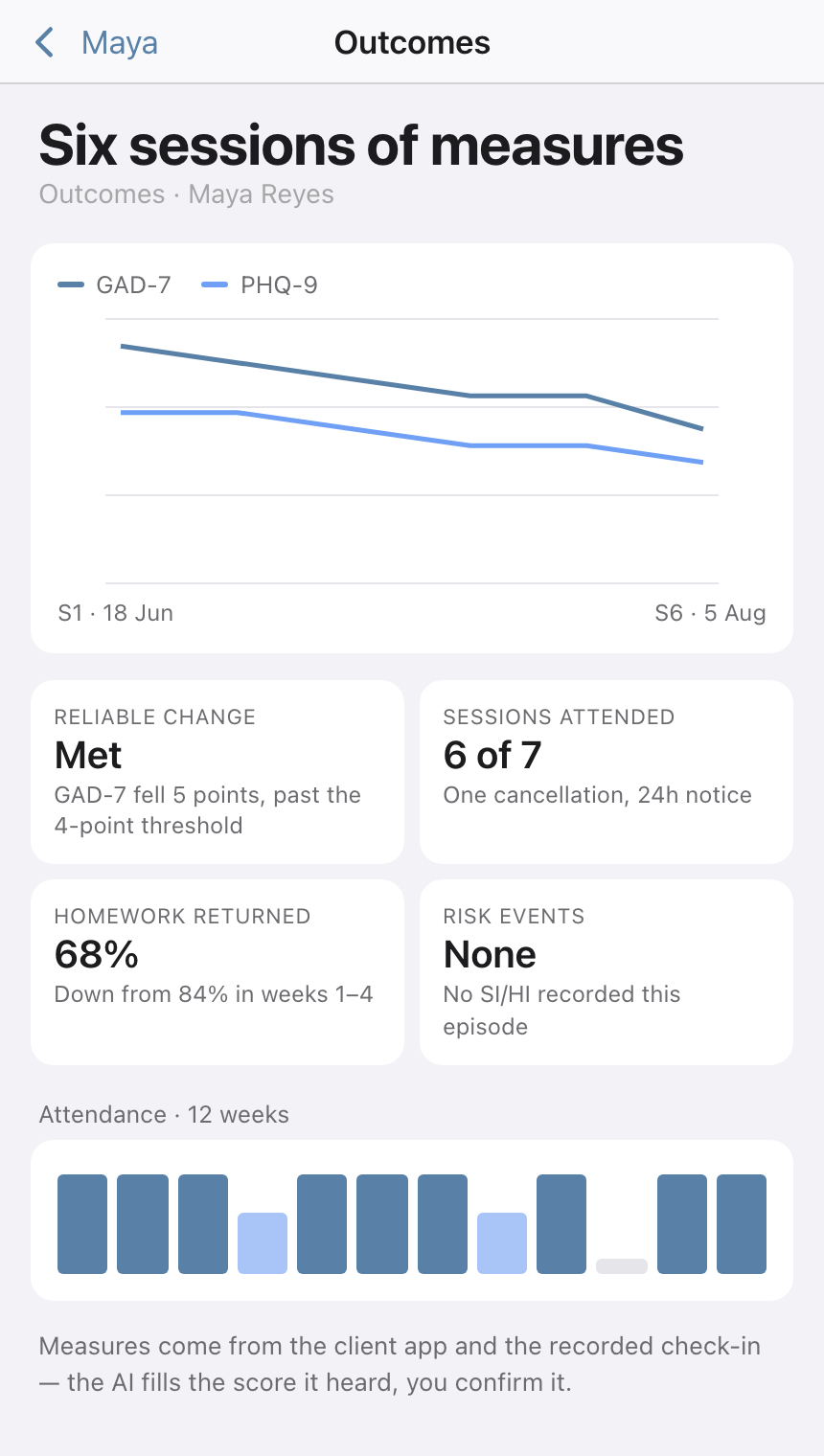
GAD-7 and PHQ-9 are plotted across the episode, with attendance banded underneath as attended, partial or missed. Reliable change is not a judgement call: a 5-point fall on GAD-7 is reported as having cleared the 4-point threshold, and it says which number it cleared.

Six sessions of outcome measures in Session Studio, with GAD-7 and PHQ-9 both trending downward on a line chart, stat tiles reporting reliable change met, six of seven sessions attended, homework returned at 68 percent and no risk events, and a twelve-week attendance strip

The caseload, filtered by what needs doing

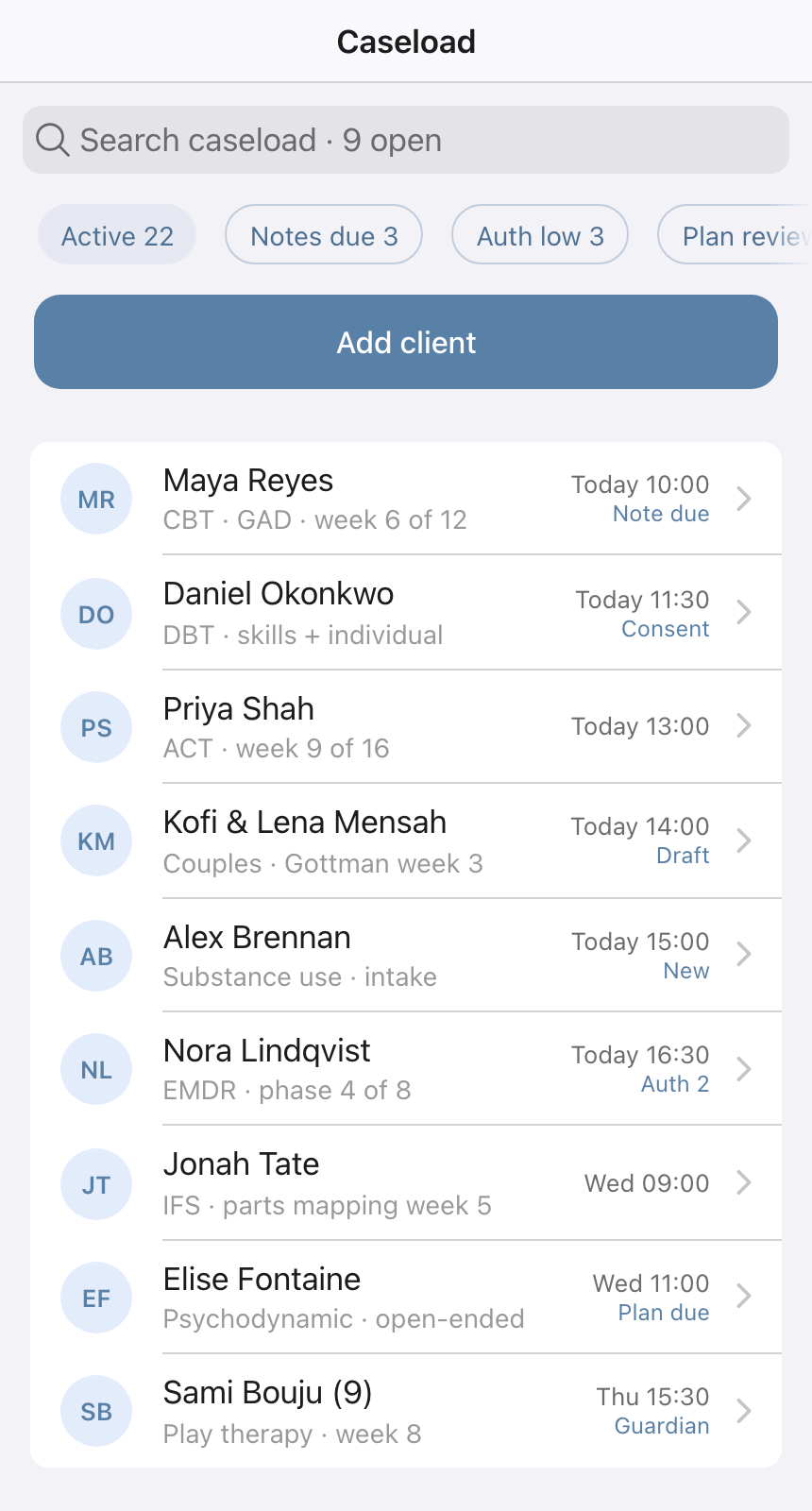
The client list is not alphabetical busywork — each row carries the protocol they are on and the one thing outstanding: a note due, a consent to re-sign, an authorisation running low, a plan review overdue.

Session Studio's caseload list with a search field, filter chips for active clients, notes due, low authorisation and plans due, and rows of clients each showing their protocol and the flag that needs attention

Billing that follows the note

CPT codes are suggested from the session — 90791 for intake, 90834 and 90837 for individual, 90847 for family — and you confirm before anything is submitted. Claims that cannot go yet are labelled with why: unsigned, needs detail, or authorization low.

An audit trail and a co-signer

Signing routes the note to a named supervisor for co-signature and writes an audit row. Settings keeps the last 24 hours of that trail visible, each entry stamped with who did it and when, and it exports for supervision.